


 Coming soon for iPad and Android tablets
A magic mirror for tricky mealtimes
Munch Mirror turns your tablet into a mirror that paints a design onto your child's face as they eat. Every bite, lick or brave sniff adds another piece. It's for families where mealtimes are hard work.
- Progress only ever goes forwards, so there's nothing to lose.
- You decide what counts today, whether that's a bite, a lick or just touching the food.
- Nothing that identifies your child leaves your tablet.

0 / 5
Bites
How a meal goes
Set it up in a minute, prop it on the table, and let your child watch themselves while you quietly mark each step from your phone.

Choose the activity and today's goal
Pick face paint, or a jungle or garden scene that grows around them. Then choose what you're working on today: brave steps, bites, new foods, or how much of the plate gets eaten. A goal can be anywhere from one step to eight.

Prop the tablet on the table
Your child sees their own face with a faint outline of the finished design, so they know what they're working towards. There's no timer and no countdown.

Every step adds a piece
Tap your phone each time they take a step, and another piece of the design shimmers into place. Reach the goal and the whole thing comes to life. If the meal ends early that's fine too, because whatever they've earned stays on their face.
Two kinds of magic
Some kids love seeing paint on their own face. Others would rather have a jungle grow up around them. Let them choose each meal, or pick for them and see which one works better.
Face paint
Painted onto their face in the mirror and tracked as they move. The outline comes first, then the colour, then the details.
Butterfly Tiger
 Robot
Scenes
A world that builds up around your child, from the far distance to right beside them, until they're sitting in the middle of it with the animals.
 JungleSloth, monkey, parrot, frog
 GardenBunny, hedgehog, snail, beeChild choosesThey pick each meal





Count whatever today's brave thing is
For some children a bite is a huge ask, so you don't have to start there. Pick what counts for your child today, and every step still earns a piece of the design.
- Brave stepsTouching, smelling, licking, tasting and biting all count equally.
- BitesJust bites. Smaller brave steps still earn a sticker on the side of the screen.
 Foods triedType in what's on the plate, and each new food they try adds a piece.
- The plateSplit the plate into halves, quarters or eighths and count each portion they finish. Half a plate can be the whole goal.
Your phone is the remote
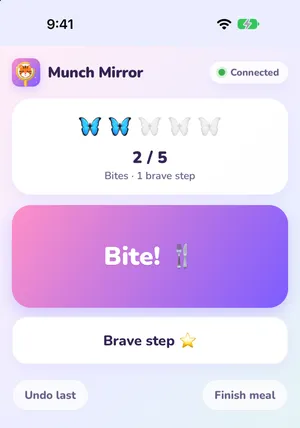
Scan the code on the setup screen and your phone becomes the remote. Big buttons, live progress, and an undo for when you tap the wrong thing.
- There's nothing to install. It's a web page, and after one scan your phone stays paired.
- It works over any Wi-Fi or mobile data, so it doesn't matter what network the tablet is on.
- You can mark steps from across the table instead of hovering over your child.
Nothing that identifies your child leaves the device
A camera pointed at your child at the dinner table deserves a high bar, so here's exactly what happens with it.
- The camera is just a mirror. Each frame is drawn on the screen and thrown away. Nothing gets recorded unless a grown-up chooses to record, and you'll always see when it's on.
- No accounts or profiles. There's nothing to sign up for and nothing that identifies your child.
- Usage stats you can switch off. The app tells us how it's used, such as which activity you chose and the steps in a meal, so we can see what helps. They go under a random ID with no names, pictures or food names, and you can switch them off in Options. The only other network traffic is the phone remote, encrypted with a key that only your tablet and your phones have.
- No ads, ever. And we'll never sell or share your data.
- Photos only if you want them. When your child reaches their goal you can save a picture of what they made. The app asks permission at that point and can only add to your Photos, not look through them.
Built to keep the pressure low
Munch Mirror borrows the approach feeding therapists use with picky eaters and children with ARFID: tiny steps, celebrated as they happen, with no bribes and nothing taken away. There's no way to fail. Nothing says "only two more", nothing counts down, and if the meal ends early the lion is just a bit less finished today.
It isn't a treatment, and it's meant to sit alongside whatever support your family already has. If you're working with a feeding therapist, dietitian or doctor, it should fit around their advice.
Be one of the first families to try it
Before Munch Mirror reaches the App Store and Google Play, we'd love a few families to use it at real mealtimes and tell us how it goes. Leave your email and we'll send you an invite when the beta is ready for your child's tablet.
You're on the list
Thanks for joining. We'll email you when the beta is ready for your tablet.
Questions
- Which tablets does it work on?
- On iPad, any model running iPadOS 17 or later, which is every iPad sold since 2018. On Android, any tablet running Android 12 or later with a front camera.
- Does it record my child?
- No. The camera only works as a mirror. There's no recording feature in the app at all, and if we ever add one it will be something a grown-up switches on deliberately. When your child reaches their goal, you or they can choose to save a picture of what they made.
- Does it need the internet?
- A meal doesn't. The phone remote does: the tablet and your phone each need a connection, Wi-Fi or mobile data, and they don't have to be on the same network. Without one, you can register steps from the grown-ups' menu on the tablet. Usage stats wait on the tablet until it's next online.
- Can my child use it alone?
- It's designed for a grown-up to run while the child watches the mirror. The settings are behind a two-finger hold so little fingers can't wander into them.
- When can I get it?
- We're getting Munch Mirror ready for the App Store on iPad and for Google Play on Android tablets. Each link will go here as soon as it's live. If you'd like to try it sooner, join the beta and we'll email you when it's ready for your tablet.